
How to Set Up The Isle Cheats for Evrima
Bought The Isle cheats and not sure where to start? This walkthrough covers status, requirements, your portal, presets, hotkeys and saving your config.
Setting up a new cheat is mostly about doing things in the right order. This walkthrough follows the same path described on the product page: check status, buy, install from your portal, load a safe preset, then tune it to your taste.
One note first. The loader and the full setup guide live in your portal and are the source of truth for installation. This article explains the overall process and the settings worth paying attention to, but follow the official guide for the exact steps.
Step 1: Check your PC and requirements
The Isle package is listed for Windows 10 or 11, 64-bit. The product page also states that Cloud DMA is required for full functionality, and the misc options include an AWS option and a Cloud DMA option. Make sure you understand this part before purchasing, because it shapes how you run the product.
Step 2: Check live status
Open the status page and confirm the product is online. Do this every time you launch after a game or anti-cheat update, not only the first time. Our article on reading status after updates explains why.
Step 3: Get into your portal
After payment clears, your portal unlocks the loader and the setup guide straight away. Download what the portal gives you and keep the guide open while you work. You can also browse the official setup guides for general help.
Step 4: Load a safe preset
The product page recommends starting with a safe preset rather than switching every option on. That is good advice. It lets you confirm everything works before you start customizing.
Step 5: Set your hotkeys
Two settings are worth sorting out immediately.
- Custom Menu Key, so you can open and close the menu comfortably.
- Custom Panic Key, so you can reach it without thinking.
Choose keys that you will not hit by accident during play.
Step 6: Build your overlay gradually
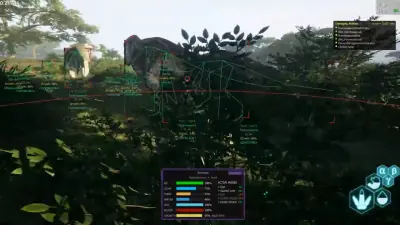
Add options one group at a time. Species, distance and health are a sensible starting point. After that, consider adding stamina, growth, corpse, water or fruit markers depending on how you play. If you want a reference for each option, see what each option does.
Use Custom ESP Colors to separate players from animals, and keep Max Distance at a level that does not crowd the screen.
Step 7: Save your config
The product description mentions saveable configs. Once you have an overlay you like, save it. You will thank yourself later when you want to switch between setups.
If something does not work
Run through this short list first.
- Is the product online on the status page?
- Did the game or anti-cheat update recently?
- Does your PC meet the requirements, including the Cloud DMA requirement?
- Have you followed the guide in your portal step by step?
If you are still stuck, ask in the Discord or open a support ticket. Setup help is part of what the product page says is included.
Not bought yet
If you are still deciding, the The Isle cheats page shows the plans, features and requirements in one place.